Realistic Label Tag Mockup Templates: A Practical Guide for Designers and Brands
Whether you're launching a new craft beer, packaging artisanal soap, or branding a line of organic skincare, the label on your product is often the first—and most lasting—impression you make. But before printing thousands of physical labels, how do you know if the design truly resonates? That’s where realistic label tag mockup templates come in: powerful digital tools that transform flat designs into lifelike, context-rich visuals. In this guide, we’ll break down what they are, why they matter, and how to use them effectively—whether you're a solo entrepreneur, freelance designer, or marketing professional.
What Exactly Is a Realistic Label Tag Mockup Template?
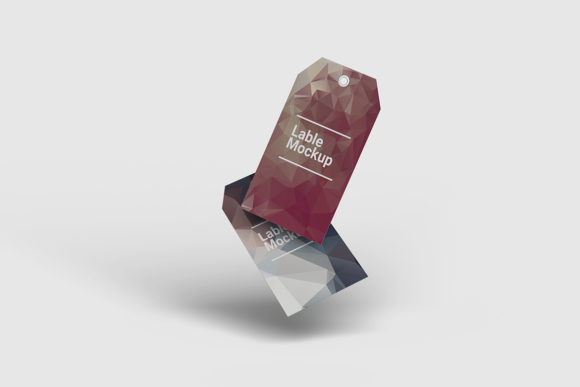
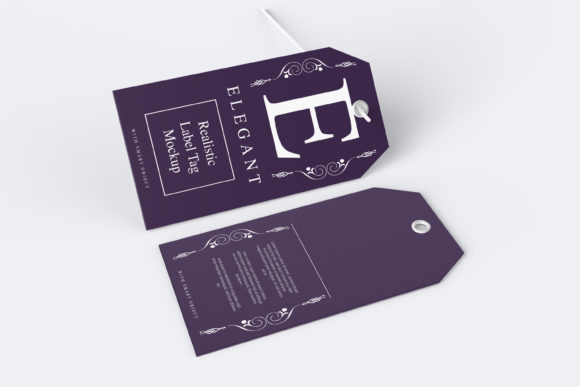
A realistic label tag mockup template is a pre-built, high-fidelity digital file (typically in PSD, Figma, or Sketch format) that simulates how a custom label or tag will look when applied to a real-world object—like a glass bottle, kraft paper bag, woven fabric tag, or aluminum tin. Unlike basic flat previews, these mockups incorporate lighting, shadows, texture, perspective, and subtle imperfections (e.g., slight curvature around a bottle neck or fiber grain on a cotton tag) to create photorealistic presentations.
Think of it like trying on clothes virtually before buying: instead of guessing how your logo will sit on a curved surface, you drop your design into the mockup—and instantly see how it wraps, folds, reflects light, and interacts with material texture.
How It Differs from Generic Mockups
- Material accuracy: A realistic mockup for a linen clothing tag includes visible weave patterns and soft drape—not just a smooth rectangle.
- Environmental context: Some templates place your label against a lifestyle backdrop (e.g., a coffee bag on a rustic wooden counter with steam rising), helping stakeholders visualize usage scenarios.
- Smart layering: Most include editable smart objects, so updating your artwork preserves lighting, depth, and blending modes—no manual retouching required.
Why Realistic Mockups Matter More Than Ever
In today’s visually saturated marketplace, credibility hinges on presentation. A pixel-perfect logo on a white canvas tells one story; that same logo rendered on a matte-finish wine bottle under natural light tells another—one of authenticity, attention to detail, and brand confidence.
Consider these practical benefits:
- Client approval & stakeholder buy-in: Presenting a mockup instead of a flat PNG dramatically increases approval rates—studies show visual context improves comprehension by up to 65%.
- Production readiness: Spotting alignment issues, bleed margins, or legibility problems *before* printing saves time, money, and material waste.
- E-commerce optimization: Platforms like Etsy, Amazon, and Shopify reward listings with lifestyle-oriented imagery. Realistic mockups help small brands compete visually with larger retailers—without hiring a photographer.
- Brand consistency across touchpoints: Use the same mockup family for social media banners, pitch decks, and packaging spec sheets—ensuring your label looks cohesive whether viewed on mobile or in print.
For Small Business Owners & Makers
If you hand-pour candles or roast small-batch coffee, you likely wear many hats—including designer. A realistic mockup lets you test variations quickly: “Does this serif font read well on a dark glass jar?” or “Will my gold foil stamp translate clearly on uncoated kraft paper?” You’re not just choosing aesthetics—you’re solving functional problems like scannability, shelf differentiation, and regulatory compliance (e.g., ensuring ingredient text meets minimum size requirements).
For Graphic Designers & Agencies
Designers use mockups as both creative tools and strategic assets. They streamline revisions (“Let’s try the label rotated 5° clockwise on the bottle shoulder”), strengthen proposals (“Here’s how your brand translates across 4 product SKUs”), and reinforce expertise (“We considered tactile perception, lighting conditions, and regional retail environments”). Bonus: Clients remember experiences—not specsheets—and a compelling mockup creates emotional resonance that flat files rarely achieve.
For Educators & Students
In design curricula, mockups bridge theory and practice. Students learn typography hierarchy not abstractly—but by seeing how letter spacing changes readability on a curved ceramic mug. They explore color theory through CMYK-to-Pantone translation challenges embedded in layered mockup files. It’s experiential learning grounded in industry-standard workflows.
Common Misconceptions—Clarified
Myth #1: “Mockups are just for final presentations.”
Reality: They’re equally valuable during ideation. Try 10 label concepts inside the *same* mockup—then compare how each performs in context. You’ll spot winners faster than with isolated thumbnails.
Myth #2: “Free mockups work just as well as premium ones.”
Reality: While free options exist, many lack true realism—missing nuanced shadows, accurate material physics, or flexible smart-object support. Low-fidelity mockups can mislead: a design that looks bold on screen may vanish on textured burlap. Invest in quality when brand integrity is at stake.
Myth #3: “Only designers need them.”
Reality: Product managers use them to brief manufacturers. Copywriters assess headline length against real space constraints. Even fulfillment teams reference mockups to verify label placement on shipping boxes. They’re collaborative infrastructure—not just pretty pictures.
Choosing the Right Template: What to Look For
Not all mockups deliver equal realism or usability. Prioritize these features:
- High-resolution source files (300+ DPI) with non-destructive layers.
- Multiple angles or variants (front, side, close-up, in-use scene) for versatile storytelling.
- Editable smart objects—so your design updates automatically without distorting perspective.
- Layered lighting controls (e.g., separate shadow, reflection, and ambient light layers) for fine-tuned realism.
- Format compatibility with your workflow (PSD for Photoshop users, Figma files for UI/UX teams, etc.).
Pro tip: Search using semantic keywords like “realistic kraft paper tag mockup Figma” or “glass bottle label mockup PSD smart object”—not just “free label mockup.” Precision yields better results.
Getting Started: A Simple 3-Step Process
- Choose your context: Identify the exact product shape, material, and environment (e.g., “matte ceramic mug, studio lighting, clean background”).
- Select and customize: Open the mockup, double-click the smart object layer, paste your label design, and save. The template handles perspective and lighting automatically.
- Refine and export: Adjust global lighting or add subtle noise/grain if needed—then export at web-optimized resolution (for social) or print-ready CMYK (for production specs).
No special training required. Most templates include intuitive video walkthroughs—and many platforms offer live preview features so you can see changes in real time.
Looking Ahead: Mockups in an Evolving Creative Landscape
As augmented reality (AR) shopping grows—think scanning a product in-store to see alternate label colors or sustainability badges—realistic mockups are becoming foundational assets for 3D and AR-ready design systems. Forward-thinking brands are already building mockup libraries with consistent lighting, scale, and metadata—enabling rapid adaptation across emerging channels.
More than a shortcut, realistic label tag mockup templates represent a shift toward empathetic, user-centered design: they ask not “What does this look like on screen?” but “How will someone *experience* this in their hands, on their shelf, in their life?”
So whether you’re sketching your first logo or scaling a global brand, treat your label not as decoration—but as a tactile promise. And let realistic mockups be the honest mirror that helps you keep it.