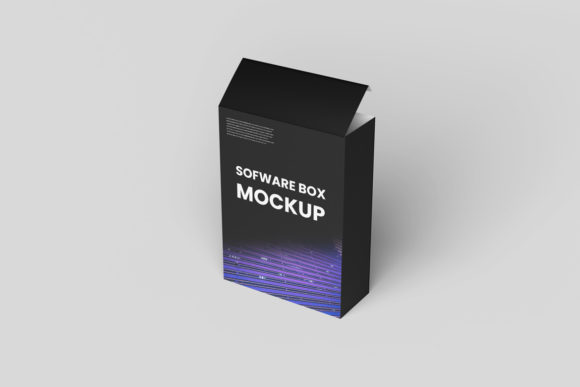
Software Box Mockup: A Practical Tool for Clearer Communication and Smarter Presentations
A Software Box Mockup is a visual representation—typically a high-fidelity, realistic image or template—that shows how software packaging, digital product displays, or application interfaces might appear in real-world contexts. Unlike generic wireframes or abstract UI sketches, a Software Box Mockup places your software inside a tangible, relatable container: a sleek desktop box, a shelf-ready retail package, a tablet screen on a desk, or even a branded laptop sleeve. It’s not about the code—it’s about context, credibility, and clarity.
For professionals who design, market, sell, or launch software—whether as solo developers, SaaS founders, agency designers, or product managers—the challenge isn’t always building great software. It’s convincing stakeholders, clients, or customers that it’s valuable, polished, and ready. You’ve likely faced situations like these:
- Presenting a new app to non-technical investors who need to “see” the product before committing;
- Preparing a website hero section or landing page where a flat screenshot feels lifeless and unconvincing;
- Submitting a proposal where visual polish signals professionalism—and a lack of it raises doubts;
- Creating social media assets or pitch decks that compete for attention in crowded feeds;
- Iterating on branding or UI without access to a full design team or 3D rendering tools.
These aren’t just aesthetic concerns—they’re trust-building moments. A poorly presented idea can stall momentum, delay buy-in, or cost you a sale. That’s where a well-chosen Software Box Mockup becomes more than decoration: it becomes strategic communication.
How a Software Box Mockup Solves Real Problems
At its core, a Software Box Mockup bridges the gap between functionality and perception. It answers an unspoken question: “What does this actually look and feel like in use?” By embedding your interface or branding into a realistic environment—a matte-black desktop box with subtle reflections, a minimalist laptop on a wooden desk, or a mobile app displayed on a hand-held device—it adds layers of context that screenshots alone cannot convey.
For example, imagine launching a project management tool. A raw PNG of your dashboard may show features—but a Software Box Mockup showing that same dashboard on a MacBook Pro, placed beside a notebook and coffee cup, instantly communicates professionalism, usability, and integration into daily workflows. That subtle realism builds credibility faster than bullet points ever could.
Practical Applications Across Roles
Different users leverage Software Box Mockup resources in distinct, highly practical ways:
- Freelancers & Agencies: Use mockups to showcase client work in portfolios without revealing proprietary code or sensitive data. A clean, branded box mockup lets you highlight UI decisions while protecting confidentiality.
- SaaS Founders: Embed mockups in investor decks, beta signup pages, or early landing pages—even before MVP completion. This helps validate demand and gather pre-launch feedback based on perceived value, not just feature lists.
- Marketing Teams: Generate consistent, on-brand visuals for ads, email headers, and case study thumbnails. A unified mockup style (e.g., all devices shown on light marble surfaces) reinforces brand identity across channels.
- Educators & Trainers: Illustrate software concepts in course materials or certification guides. A realistic mockup helps learners mentally map interface elements to real-world usage scenarios.
The outcome? Faster alignment, fewer revision cycles, stronger first impressions, and higher conversion rates—especially when paired with clear messaging.
Choosing and Using the Right Software Box Mockup
Not all mockups deliver equal value. Prioritize quality and flexibility over quantity. Look for:
- Smart Layers: PSD or Figma files with clearly labeled, editable layers let you swap in your UI with one click—no design degree required.
- Realistic Lighting & Perspective: Shadows, depth, and ambient texture matter. Avoid flat, cartoonish templates that undermine professionalism.
- Multiple Contexts: One mockup for desktop, another for mobile, and a third for print packaging gives you versatility across touchpoints.
- Licensed for Commercial Use: Ensure your chosen Software Box Mockup permits use in client work, sales materials, and public-facing assets—without attribution or hidden fees.
Pro tip: Start simple. Pick one versatile mockup—say, a premium desktop box with soft shadows—and master it across three use cases (e.g., homepage banner, investor slide, social post). Consistency builds recognition faster than variety.
What to Keep in Mind During Implementation
A Software Box Mockup amplifies impact—but only when used intentionally. Avoid common pitfalls:
- Don’t overload the scene. Remove unnecessary props or background clutter unless they reinforce your message (e.g., a calendar app mockup next to a physical planner).
- Match your UI’s tone. A playful, colorful app shouldn’t sit inside a monochrome industrial box—unless irony is part of your brand voice.
- Optimize file size. Large mockup exports slow down websites and emails. Always compress final PNGs or use modern formats like WebP without sacrificing clarity.
- Update regularly. As your UI evolves, refresh your mockups. Outdated visuals erode trust faster than no visuals at all.
Also remember: A Software Box Mockup works best when paired with purposeful copy. Instead of “Our software looks great,” try “See how [Product] simplifies workflow—right from your desktop.” Let the mockup show; let the words clarify.
Getting Started Today
You don’t need expensive software or advanced design skills to begin. Many high-quality Software Box Mockup resources are available as affordable downloads or included in design tool libraries (like Figma Community or Adobe Exchange). Some even offer free starter versions—ideal for testing fit before investing.
Start by identifying your next high-stakes visual moment: Is it a client proposal due next week? A landing page redesign? An upcoming demo? Download one trusted mockup, insert your latest UI export, adjust lighting if needed, and drop it into your asset. Compare how it feels versus your current screenshot. Chances are, the difference in perceived readiness—and confidence—is immediate.
Over time, build a small library of go-to Software Box Mockup variations: one for desktop, one for mobile, one for presentation slides. Tag them clearly, store them in your team’s shared drive, and revisit them each quarter to ensure they still reflect your brand’s evolution.
In a world where attention is scarce and trust is earned visually, the Software Box Mockup isn’t a “nice-to-have”—it’s a low-effort, high-return tool for communicating value with clarity, consistency, and quiet authority. It doesn’t replace great software. But it ensures great software gets the reception it deserves.