Top View Card and Holder Mockup: A Practical Tool for Visual Clarity
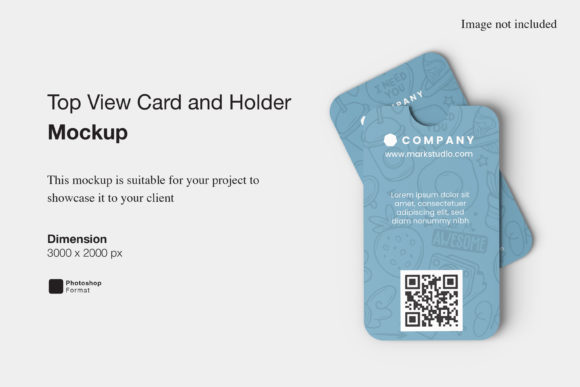
When presenting a physical product—especially something small, tactile, and design-forward—how you show it matters as much as what you’re showing. The Top View Card and Holder Mockup fills a precise but powerful niche: it offers a clean, realistic, overhead perspective of a card nestled securely in its matching holder. Unlike angled or 3D mockups, this style strips away visual noise to spotlight proportion, alignment, color harmony, and material texture—all from above.
What Exactly Is a Top View Card and Holder Mockup?
At its core, a Top View Card and Holder Mockup is a high-resolution, layered digital template—typically built in Photoshop or compatible design software—that simulates how a flat card (like a business card, loyalty card, or event pass) looks when placed inside a complementary holder (think acrylic stands, magnetic sleeves, or minimalist desk trays). The “top view” means the camera angle is perfectly perpendicular—no foreshortening, no shadows from side lighting—just crisp, measurable realism.
These mockups are not generic stock images. They’re carefully crafted with smart object layers, so designers can replace placeholder content with their own designs while preserving realistic lighting, subtle reflections, and surface grain. Some include optional shadow depth controls, background toggles, or even alternate holder finishes (matte black, frosted clear, brushed metal).
Why This Perspective Works So Well
Human perception relies heavily on context—and the top-down view delivers instant spatial understanding. When you see a card centered in its holder from above, you immediately grasp:
- Fit and scale: Does the card fill the holder comfortably—or look lost or cramped?
- Alignment cues: Are edges flush? Is there intentional negative space around the card?
- Material contrast: How does a glossy card interact with a matte holder? Does transparency play a role?
- Design hierarchy: With no perspective distortion, typography, icons, and layout elements remain true to size and spacing.
This makes the Top View Card and Holder Mockup especially valuable during early-stage client reviews, internal team alignment, or production handoffs—where clarity trumps stylization.
Who Benefits—and How
The usefulness of this mockup format spans several roles and scenarios:
Graphic Designers & Brand Practitioners
They use it to test how logo placement, color blocking, or QR code positioning works within real-world constraints. A card might look balanced on screen—but does that centered icon still feel grounded when seen alongside the holder’s frame? The top-down view answers that instantly.
Small Business Owners & Solopreneurs
Ordering custom-printed cards and holders often involves minimum quantities and lead times. Before committing, they drop their draft designs into a Top View Card and Holder Mockup to preview cohesion—checking if their brand blue reads well against a charcoal-gray acrylic holder, or whether white text stays legible on a translucent sleeve.
Event Planners & Conference Organizers
When designing delegate passes, speaker badges, or VIP credentials, consistency across touchpoints is essential. A top-view mockup helps visualize how a lanyard-attached card will sit inside its breakaway holder—or how a table-top name badge aligns with its stand—without needing physical prototypes.
E-commerce Sellers & Print-on-Demand Creators
Product listings thrive on authenticity. A flat, styled photo may look polished—but shoppers increasingly expect dimensional context. Using a Top View Card and Holder Mockup, sellers showcase not just the card, but how it lives in daily use: resting on a desk, stacked beside a notebook, or displayed next to a laptop. That subtle storytelling builds trust faster than specs alone.
Strengths You’ll Notice Right Away
- Speed: Swap designs in under a minute—no photography setup, lighting adjustments, or retouching.
- Consistency: Maintain identical lighting, background, and framing across multiple variants (e.g., gold foil vs. spot UV versions).
- Accessibility: Works seamlessly with screen readers and design collaboration tools—unlike embedded video or complex 3D viewers.
- Print-readiness: Many include CMYK layers and bleed guides, bridging the gap between digital mockup and physical output.
Realistic Considerations—Not Just Limitations
No mockup replaces real-world testing—and that’s okay. Here’s what to keep in mind:
- It shows appearance—not feel: You’ll see how a soft-touch laminate looks next to a rigid holder, but not how it resists fingerprints or slides out smoothly.
- Scale accuracy depends on source files: If your card design isn’t exported at true 1:1 resolution (e.g., 3.5 × 2 in at 300 DPI), proportions may drift slightly—even in a top-down view.
- Lighting is simulated, not captured: Reflections and highlights are artfully rendered, not photorealistic—so ultra-glossy surfaces or metallic inks may need minor manual tweaks for fidelity.
- Holder variations matter: Not all mockups support interchangeable holders. Check whether yours includes options like slot-style, clamp-style, or rotating bases before purchase or download.
How to Choose the Right One for Your Needs
Start by asking three questions:
- What’s my primary use case? If it’s client presentations, prioritize mockups with clean, neutral backgrounds and editable shadow intensity. For social media, look for versions with subtle lifestyle context (e.g., faint desk texture, blurred coffee cup edge).
- What file format do I actually need? Photoshop (.PSD) gives full layer control—but if you use Figma or Affinity Designer, verify compatibility or seek alternatives labeled “smart object compatible.”
- Does it match my production specs? Confirm whether the mockup reflects standard card dimensions (3.5 × 2 in), common holder depths (¼ in, ⅜ in), or specialty sizes (square, rounded corners, vertical orientation).
A well-chosen Top View Card and Holder Mockup doesn’t just save time—it sharpens decision-making. It turns subjective feedback (“I’m not sure about the font size”) into objective observation (“The 9-pt type hits the holder’s inner margin—let’s bump to 10.5 pt”).
Going Beyond the Obvious: Unexpected Uses
Creative professionals often discover secondary applications:
- Instructional visuals: Show step-by-step assembly—e.g., “Slide card in here,” with arrows overlaid directly onto the mockup.
- Accessibility previews: Simulate how low-vision users might perceive contrast between card and holder using grayscale overlays.
- Trademark documentation: Include top-view mockups in brand guidelines to demonstrate approved usage contexts—not just logo lockups.
- AR prep work: Use the precise geometry of the mockup as a reference when building simple augmented reality experiences for trade shows.
Final Thought: Clarity Starts With Perspective
In a world saturated with flashy renders and cinematic spins, the Top View Card and Holder Mockup stands out by doing one thing exceptionally well: offering honest, unembellished context. It doesn’t distract. It doesn’t exaggerate. It simply says, “Here’s how this will exist in space—clear, measured, and ready for action.”
Whether you’re refining a startup’s first business card suite, preparing assets for a global retail rollout, or helping a local artist visualize their next limited-edition print release, this mockup format rewards attention to detail—and returns it in usability, confidence, and shared understanding. And sometimes, that top-down clarity is exactly what moves a project from concept to confidence.